Welcome to DataPipeline plugin’s documentation!
Business Purpose
Designing data pipelines using Topology and Orchestration Specification for Cloud Applications (TOSCA) standard language enables the ability to easily compose data driven applications from independently deployable, schedulable and scalable pipeline tasks, such as microservices, serverless functions or self-contained applications.
The aim is to provide standards based methodology and tools for contolling the life-cycle of such composable data pipelines in a DevOps manner and to enable companies to move from monolithic data management applications to freely reusable, composable, and scalable data pipeline services.
Technical Details
RADON Datapipeline Methodology
Following figures shows the basic concept of data pipeline. RADON data pipeline provides an environment to build serverless data intensive applications and handle the movement of data between different clouds in an efficient manner. In the process of data movement, RADON Data pipeline allows the users to apply analyticcal operations onto the data taking the help of serverless platform. Such applications can be designed using TOSCA language. We see PipelineBlock as a basic building block of a TOSCA based data intensive appications.
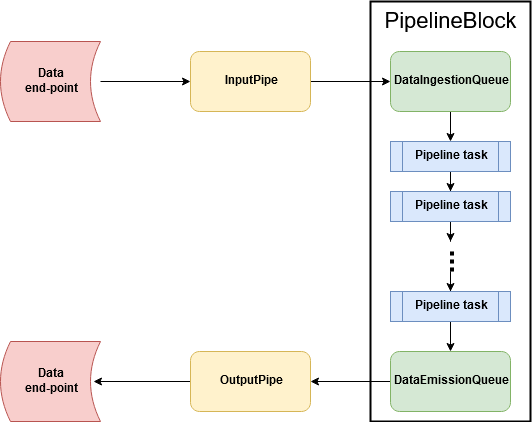
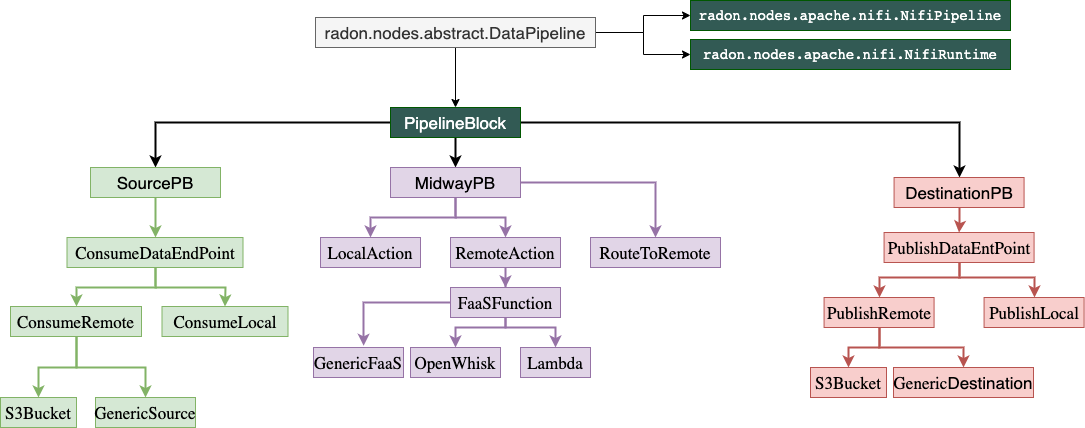
A PipelineBlock can be designed for different pipeline tasks, such as extracting data from a remote database, or from a AWS S3bucket, processing the data by invoking serverless function etc. In RADON data pipeline, the TOSCA pipelines nodes structured in a manner presented in following figure.
Where is data pipeline plugin in RADON-Architecture?
This consortium will design and develop a set of TOSCA based pipeline nodes that will be available in radon particles repository. The service template developed using those datapipeline nodes will then be forwarded to the data pipeline plugin which will make sure that the user-designed service template is workablle and the pipelines can be deployed in the required cloud or local environment.
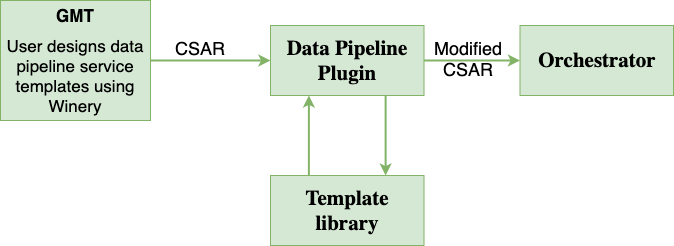
The above picture presents the interaction of data pipeline plugin with other RADON components. The pipeline plugin can be invoked through a command line interface or through REST-based interface.
Plugin’s responsibilty?
The pipeline plugin will be responsible for: * Parsing and reversing the pipeine CSAR * Attaching the necessary relationship templates in case of multi cloud pipeline deployment. * Updating the node templates based on the targeted cloud environment. * Ensuring the data encryption in multi-cloud service deployment
What is inside data pipeline plugin?
- This plugin unzip the CSAR file, get the YAML file (the service blueprint).
- Parse the the YAML file and understand the node topolology.
- Make any changes/modification to the YAML file itself, if needed.
- Updates the templates, if needed.
- Zip again all and create the CSAR file.
- Pass the ZIP file to the RADON Orchestrator.
This is the initial version of the Data pipeline plugin. In the proceeding version, the plugin will be improved and will come with lots of features.
The following video provides a 5-minute demo.
Getting Started
Generating Pipeline CSAR
The TOSCA based data pipeline service tempalte can be generated usng the RADON Graphical Modelling tool, Winery. You can follow this step to setup RADON GMT.
- Open Winery and click on Service Templates manu.
- Create a new srvice tempalte by clicking on Add New button.
- Provide suitable name and click on Add button.
- Here you can see the list of service templates. Select newly created service template.
- Now select the Topology Template menu item followed by Open Editor button.
- In the Winery: topology modeler window, find the suitable data pipeline TOSCA nodes.
- Drag the required TOSCA nodes and set the properties and make the connection with other pipeline nodes.
- An example for such is given can be seen in following figure:
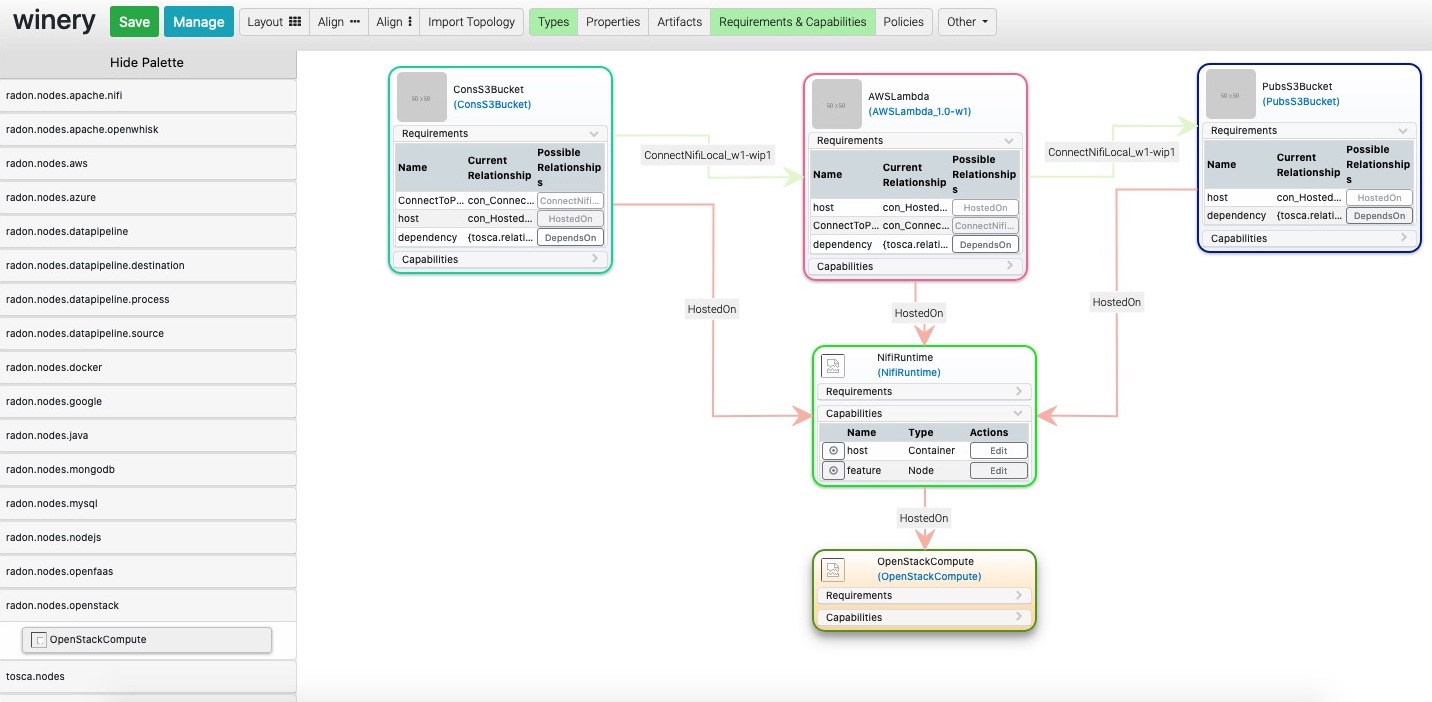
The figure contain three pipelines: ConsS3Bucket, AWSLmabda, and PubsS3Bucket. These three pipelines are hosted atop Nifi environment within OpenStack private cloud environment.
- Export the CSAR file, by clicking on Other -> Export CSAR.
you may refer to Winery User Guide for further instruction on how to export the CSAR.
The exported CSAR will furher be sent to data pipeline plugin.
Verifying and updating with data pipeline Plugin
The plugin can be used through command line interface or by invoking the REST API.
How to use the plugin CLI?
- Download the plugin
- Make sure that Python environment is working on your machine.
- Keep your TOSCA service ready and note the path.
- In this version of the Plugin, YAML file is expected as input.
- Execute the following command
python DPP <path to the yaml file>
How to use the plugin API?
The plugin also contains a REST-based interface, using which users can execute the plugin on-demand or include it as a part of a CI/CD process. DataPipeline plugin is publicly available under the Apache License 2.0 open-source license in GitHub: https://github.com/radon-h2020/radon-datapipeline-plugin
Steps: 1. Web service version of the plugin is available in the datapipeline-server folder
- Download the github project repository
- User Docker to build and deploy the data pipeline plugin webservice
cd  datapipeline-server

# building the image
docker build -t radon_dpp_server .

# starting up a container
docker run -p 8080:8080 adon_dpp_server
- Open your browser to here: http://localhost:8080/RadonDataPipeline/ui/
Additional Information
Development and Downloads
- Source code repository: https://github.com/radon-h2020/radon-datapipeline-plugin
- Demo:
Contact
- Chinmaya Dehury and Pelle Jakovits, Institute of Computer Science, University of Tartu, Estonia
Acknowledgments
This work is being supported by the European Union’s Horizon 2020 research and innovation programme (grant no. 825040, RADON).